H20 Audio Sonar 2 Pro waterproof headphones review: the ones I’ll be using for all my long swims now
I‘ve tried several sets of waterproof headphones, but the comfort and ease of use have made the new H20 Audio Sonar 2 Pro my choice

220 Triathlon Verdict
Superb set of bone conduction headphones if you don’t want the over-the-ear kind. Music upload simple but time-consuming, Sound quality is great. Score: 87%
Pros
- Very comfortable to wear
- Great sound quality
- Ease of uploading music
- Hard case included
Cons
- Can’t be used out of the pool
- Time taken to upload music
- Little bit fiddly to attach
Introduction
Head to any swimming pool and waterproof headphones for swimming are becoming more and more popular.
This is partly to do with increased availability, but also with the adoption of bone conduction technology which really improves sound quality underwater. In fact, most waterproof headphones designed for swimming will now use this method.
I’ve tested several sets of waterproof headphones over the last 12 months. I’m happy to report they have made a huge difference to my training, to the point I believe they’re the training hack I never knew I needed. I don’t use them on every swim, but on the days I need to swim long in open water, or just need to motivate myself in the pool, they’re a game-changer.
In this test I’m looking at the H20 Audio Sonar 2 Pro headphones, which use bone conduction technology but have a couple of key differences to others in the market which offer real benefits for some swimmers.
How we test waterproof headphones
Each set of headphones is put through the same testing process. First they are assessed for ease of set-up. How simple is it to download music on to them ready for swimming and to charge them? I’ll then consider how simple they are to use and how comfortable the fit is as well as how easy they are to use once in the water. Sound quality is assessed with the same playlist featuring a range of types of music added to each set to compare tone and how quality of playback. At a minimum I will do several swims in each set of headphones in the pool of one to two hours – though in summer when the water is warmer I’ll also test waterproof headphones on longer lake swims as part of my training. You can find out more about how we test and rate products here.
Unboxing the H20 Audio Sonar 2 Pro headphones

The H20 Audio Sonar 2 Pro headphones replace the earlier Sonar version (no longer available) and is 40% lighter and thinner. The company also offer an over-the-ear unit, the Tri 2 Pro, but what makes the Sonar 2 Pro unique is that the bone conduction transmitters clip onto your goggle straps rather than sitting over the top of your ears.
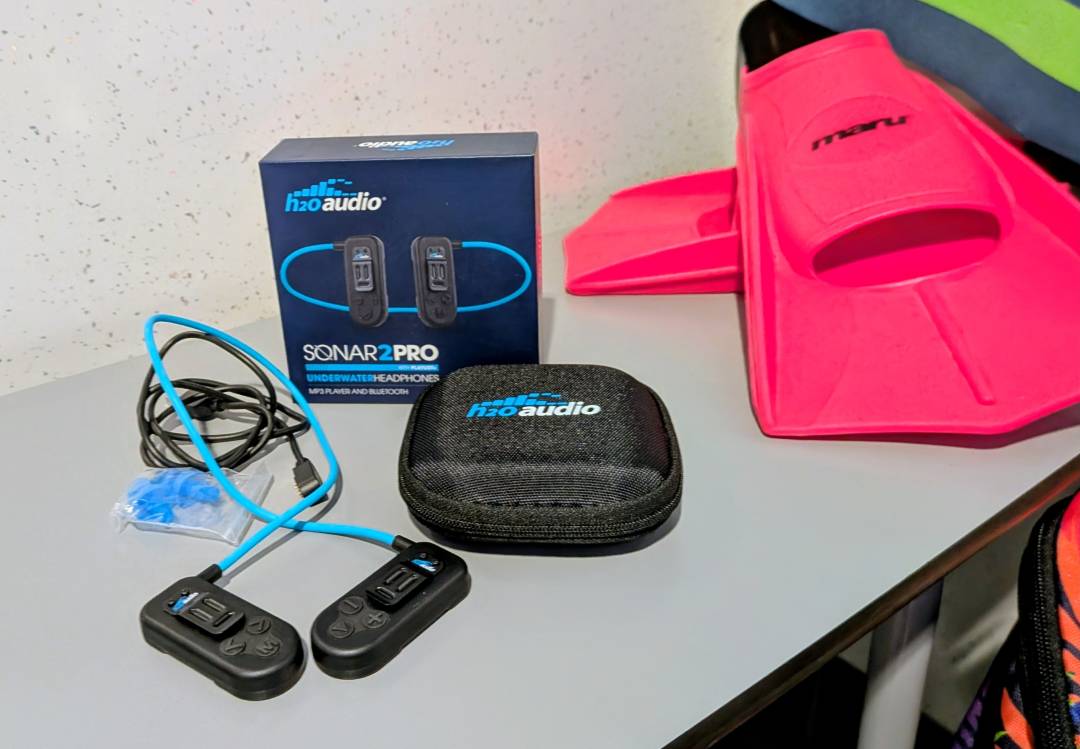
Inside the box you’ll find the unit itself, plus a hard case, charging cable and set of earplugs. The hard case is a nice touch as from experience I find it’s tempting to chuck headphones in my swim bag after a session and they can easily get damaged – having a hard case and the discipline to use it prevents this!
The case also includes a mesh compartment for the accessories, but I tended to just keep the earplugs in this and the cable separate to avoid getting it wet.

Charging the Sonar 2 Pro
Charging the H20 Aadio Sonar 2 Pro is easy – you just attach the magnetic cable and plug it in to any USB socket. Within one to two hours they are fully charged.
On full charge, the headphones will give you six hours of memory playback or nine hours of Bluetooth streaming, which I found rang true in testing.
To use the headphones in the water you’ll need to add music and use ‘memory mode’ as you can’t stream music underwater with most units on the market, this included.
Adding music to the Sonar 2 Pro
Uniquely, H20 Audio products use ‘Playlist+’ which works by connecting the unit via the downloaded app on your phone and recording music in real time as you play or stream. Think of it a bit like taping music of the radio (if you’re a similar age to me and remember doing this!).
I found this system worked well and once recorded to the headphones, a playlist was created in the app which also recognised the names of the songs and then allowed you to create playlists and move tracks around like on the iPod Shuffles of old.
This is great if you don’t have music stored as files that can be downloaded or CDs that can be uploaded to a computer, the system that many MP3 players use.
It also means you can add music with just your phone and the free app – no need to use a computer.
The drawback here is time – you have to allow the headphones to listen and record in real time, so you can’t quickly add music before a swim. I also found a couple of times that I pressed a button by mistake on my phone while recording which stopped the music and I had to start again. User error for sure – but still frustrating!
On the whole the app worked well though and was intuitive and straightforward to use.
As for the unit itself, there are three buttons on each headphone. One side has volume and play/pause and one side has track skip/rewind and an ‘M’ button to swap between memory and streaming modes.
The buttons are chunky and easy to operate, even with wet hands and I found it easy to remember which buttons to press for various functions.


Using the H20 Audio Sonar 2 Pro headphones
Once you’re ready to swim, the Sonar 2 Pro headphones work by bone conduction. The large pads on each side sit alongside your ears and transmit the sound through your skull, while you wear a pair of basic earplugs (supplied) in your ears to block water noise.
As these don’t include a hook over the top of your ear like other versions, you need to attach the unit to the two sides of your goggles’ straps with the small metal clips attached to the unit.
I found this simple enough to do and tested them with a pair of Zoggs Predator Flex goggles. You can attach them before putting your goggles on but in practise I found they often popped off when I did this, so it’s easier to put the goggles on and then slide the unit onto the straps afterwards.
Alternatively, you can just tuck the headphones into the side of your swim cap and use the slight compression to keep them in place, though you’ll need to make sure you’re using a swim cap that doesn’t slip!
Once in the water, I found the unit stayed in place perfectly and didn’t dislodge at all through front crawl swims including tumble turns.
The real benefit I found with this design was how comfortable they were. The lightness and streamlined design was easy to forget about as I swam and with no securing band over the top of my ears there was no discomfort, even on very long swims.
One other thing to consider is the level of waterproofing. The H20 Audio Sonar 2 Pro is waterproofed to IPX8 and can withstand unlimited time in water. Others I have tested have only been manufacturer waterproof-tested to two or three hours (though I have used them for longer than this in practise).
Sound quality was superb for both music and spoken word audio such as podcasts. H20 Audio tell me the technology is devised to deliver enhanced audio clarity and amplified bass designed specifically for swimming and this rang true in testing.


Verdict
There are definitely real pros with the H20 Audio Sonar 2 Pro headphones. I loved the sound quality and the fact that you can add offline music even without access to files on a computer. The app is simple and easy to use.
For me the real bonus comes with the comfort of use of these for long swims. Not having a hook over the top of the ears like the majority of bone conduction styles meant they were very comfortable over long swims.
However that may also prove a downside if you want to use these for other sports or day-to-day use as you’ll need to find a way of keeping them in place without goggles or a swim cap. You could use a sports headband or similar, but it would be great if H20 Audio offered an accessory for this purpose to allow more versatility.
All in all though, these are a winner for me on long training swims. Great sound quality, ease of use and being very comfortable ticks all the main boxes!
H20 Audio Sonar 2 Pro Specs
| Water resistance | IPX8 | |||
| Storage | 8 GB | |||
| Battery charge time | 1-2 hours | |||
| Battery life | 9 hours memory / 6 hours Bluetooth |


 Helen Webster
Editor, 220 Triathlon
Helen Webster
Editor, 220 Triathlon