First two athletes are FREE! How tri coaches cut admin and coach more


When you run your own triathlon coaching business it can often feel like you spend all your time planning and doing admin. Here are some tips from the team behind Good Coach App to help you plan faster and coach more.
Coaching should feel like shaping great sessions, not chasing tabs. When plans live in folders, messages scatter across apps and invoices slip, the week gets noisy fast. The fix is a simple workflow that keeps your tri weeks tidy and everything in one place. These tips work in any tool. They shine inside Good Coach App.
Plan faster and keep context

- 1. Plan the week in one sitting
Plan once, not every day. Pick a fixed slot and stick to it. Set each athlete’s goal, place the anchors, add bricks, then fill the gaps with clear targets. Personalise duration and intensity, check the weekly load, and publish the full week so the rhythm is clear from day one. - Turn repeats into reusable blocks
Stop rewriting the same sets. Save your best sessions as blocks you can drop in and edit. Keep a small library for base, build, race, plus a few go-to bricks. Name them in plain language so you find them fast and avoid copy-paste errors. - Keep coach–athlete communication in one place
Scattered messages waste time and context. Keep conversation, files, and feedback on the workout itself. Athletes add a short note after key sessions. You reply on the same workout and attach a quick video when form cues matter. Nothing gets lost. - Improve athlete adherence
Clear plans get done. Put targets where eyes land first and add cues that change behaviour. Offer a time-poor version inside the session so busy days do not become skipped days. The result is more green ticks and fewer I missed it messages. - Send workouts to the watch
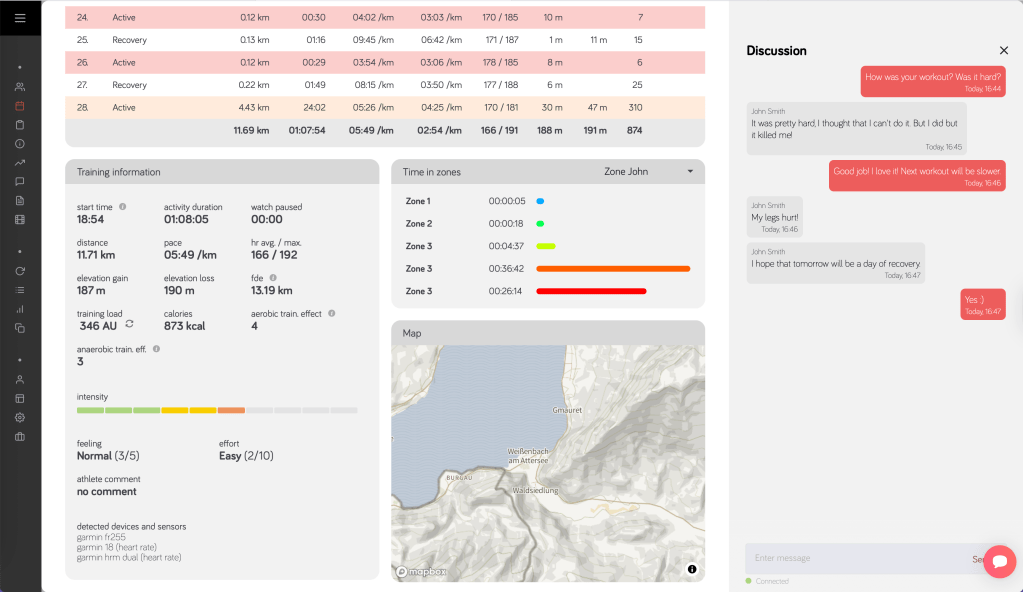
Plans stick when guidance is on the wrist. Structured sessions sync to supported athlete watches so targets and steps appear during the workout. The athlete follows intervals, hits the right zones, and finishes with fewer guesswork moments. In Good Coach App, planned sessions can sync to supported devices so athletes see the plan where it matters most. - Use one clean weekly view
You do not need fifty charts. You need a weekly summary you can read in seconds. Look for load trend, time in zones, and completion. Make one decision and move on. - Stay clear on mobile and nimble when life happens. Plan mobile first for clarity
Most athletes check the day on a phone. Write short, direct instructions. Keep notes only where they change execution. A clear day view drives better follow-through. - Migrate in a small pilot
If your setup slows you down, move with a two athlete pilot. Map zones. Bring core templates. Deliver one full week. When it feels right, roll out to the rest. Training stays live. Confidence stays high. - Swaps without stress
Life will move sessions, so treat a swap as a small change that protects the week. If a pool session is missed, shift skills later and shorten the main set to keep weekly load steady. If a brick lands on a busy day, split it, keep the bike now and the short run tomorrow, and preserve the purpose. If tech fails or the battery is low, switch from power to RPE and keep feel and duration the same. Write simple rules once so your week always has a safe fallback. In Good Coach App you drag a session to a new day and toggle targets to RPE when needed, so the plan adjusts without breaking the week.
Is Good Coach App right for you?
The founder of Good Coach App, Marcin Sikora, has this message for coaches wondering if the app is right for them:
“Good coaching is not about perfect plans, it is about being responsive when athletes need you. At 15 athletes, my spreadsheet system made me choose, stay small and be a good coach, or scale up and become the coach who is always catching up. I am an entrepreneur. Working this old way made no sense. Why should administrative chaos cap your coaching business? I wanted to grow to 50+ athletes while staying adaptive, knowing what is happening, reacting quickly when life interferes, adjusting plans that were never meant to be written in stone. I built Good Coach App to solve both problems, be the responsive coach you want to be and scale the business you deserve. Hundreds of coaches were stuck in the same trap.”
Cut the noise and the coaching gets better. Plan the week once. Keep talk on the workout. Sync sessions to the watch. Use simple swaps when life happens. Do it all in one place so the gains stick – find out more and register here.
Pricing stays simple. The first two athletes are free. Additional athletes 3 to 15 are €3 per month each, then athletes 16 to 29 are €1.50 each. From 100 onward it is €1 each. To put it simply, if you have no more than 100 athletes, you pay a maximum of €60.
Find out more at the link here: Good Coach App – online coaching application for coaches. There are no hidden fees and if you want the exact figure for your roster, use the pricing calculator. Find out more at the Good Coach App website.


 Helen Webster
Editor, 220 Triathlon
Helen Webster
Editor, 220 Triathlon